Fix it in this order:
- Verify the status is real. The Page Indexing report lags behind reality; the URL Inspection tool provides more current URL-level information. Many "excluded" URLs are already indexed.
- Decide whether the page should be indexed at all. Feeds, pagination, filter URLs, and image files often belong in this bucket.
- Rule out technical and rendering problems. Run Test Live URL and confirm Google can see your main content, not an empty shell.
- If the page renders fine, it's likely a value decision. Fix thin, duplicate, or "commodity" content by adding first-hand experience, original data, and a clear standalone purpose.
- Strengthen internal links from relevant, indexed pages; consolidate near-duplicates with canonicals or 301s; keep only canonical URLs in your sitemap.
- Request indexing once, after making a real change, then monitor over weeks, not hours.
The single most useful reframe: stop asking "how do I force Google to index this?" and start asking "why should Google store this URL instead of the thousands of near-identical pages it already has?" Every effective fix flows from that question.
Your next 60 minutes: export the report → filter out expected patterns → pick your five most important stuck URLs → run Test Live URL on each → score them with the Index Worthiness Scorecard → address the lowest-scoring dimension on each → log the date → recheck in 30 days.
Primary references
TL;DR Summary
| Question | Short Answer |
|---|
| What does it mean? | Google crawled the page but excluded it from the index, usually because of a quality or relevance decision rather than a crawl error. |
| Is it a penalty? | No. It's an algorithmic exclusion, not a manual action. |
| Most common cause | Thin, duplicate, or "commodity" content that adds nothing beyond what's already indexed. |
| Second most common cause | Weak or missing internal links (orphaned pages). |
| Fastest fix that works | Adding contextual internal links, often visible within days to weeks. |
| Fix that takes longest | Site-wide content quality remediation, which can take 3-6+ months. |
| Should I spam "Request Indexing"? | No. Do it once, after making a real change. Repeated requests change nothing. |
| When should I ignore this status? | Pagination, RSS feeds, filter or parameter URLs, image files, and expired content are often supposed to stay excluded. |
What "Crawled – Currently Not Indexed" Actually Means
In Google Search Console, this status appears under Indexing → Pages → Why pages aren't indexed. Google's own documentation describes it minimally: the page was crawled but not indexed; "it may or may not be indexed in the future; no need to resubmit this URL for crawling."
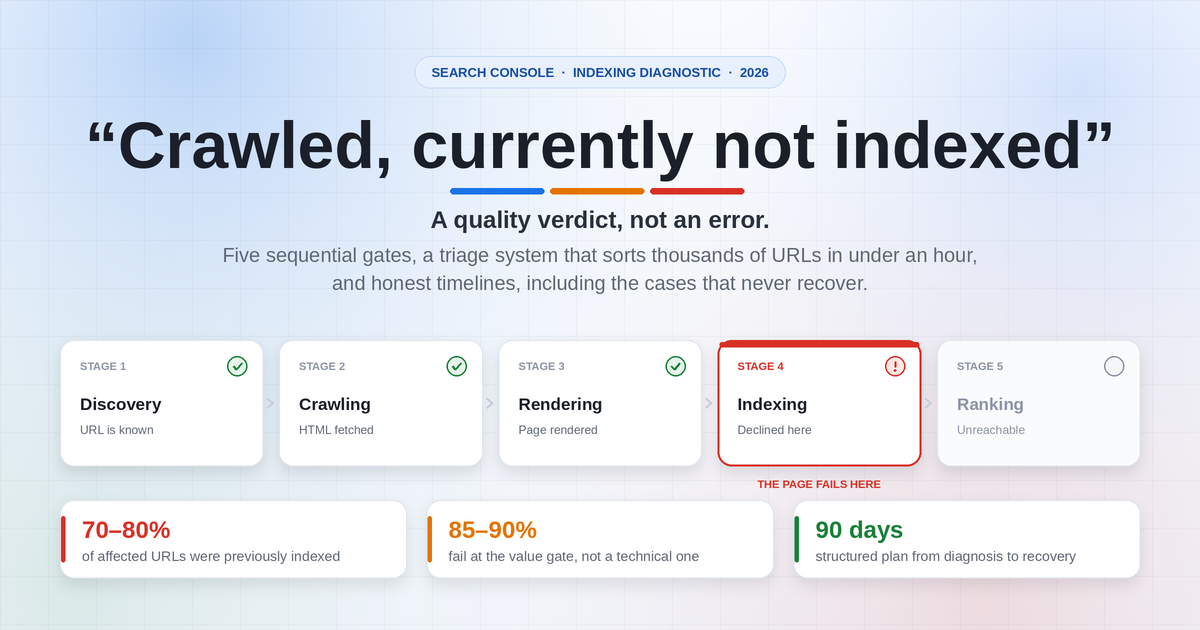
To understand where your page failed, picture Google Search as a four-gate funnel:
GATE 1: DISCOVERY       → Google learns the URL exists (links, sitemaps, redirects)
                           Fails as: "Discovered – currently not indexed"
        ↓
GATE 2: CRAWL & RENDER  → Googlebot fetches and renders the page
                           Fails as: "Blocked by robots.txt", server errors, soft 404
        ↓
GATE 3: INDEX SELECTION → Google decides whether to store it   ← YOU ARE HERE
                           Fails as: "Crawled – currently not indexed"
        ↓
GATE 4: SERVING/RANKING → Google decides to show it for a query
                           Fails as: indexed but zero impressions
Critical implication: because your page cleared Gates 1 and 2, fixes aimed at discovery, such as resubmitting sitemaps, pinging, and "instant indexing" tools, are almost useless here. Google already found and read the page. It chose not to keep it.
The word "currently" matters: Google may reconsider later, particularly after meaningful changes. But it makes no promise.
What Google has actually said about this status
Public statements from Google representatives clarify what the documentation doesn't:
- On the mechanics (Search Off the Record podcast): "Crawled – currently not indexed … means we visited them and we didn't put them in the index. And that can have all sorts of different reasons."
- On site-wide quality as a driver: "If our systems are seriously worried about the quality of a website … they will reduce the number of pages that they index. We'll probably crawl a lot less, we'll index a lot less."
- On the "why bother" problem: "Sometimes it's also there's so much other stuff that is just as good. So why would we add it to the index?"
- On it not necessarily being a page-level bug (John Mueller): "You can't force pages to be indexed. It's normal that we don't index all pages on all websites. It's not an issue with that page, it's more site-wide."
- On the current bar for inclusion (Google Search Central Live): because AI has lowered the cost of producing content, the content Google most wants to index now offers personal experience and knowledge no one else has. If Google crawled and declined, the two reasons given were (1) a technical issue, or (2) "we looked at it and found it not to be good."
- Google also sometimes experiments, temporarily indexing a page to see whether users respond well, which helps explain pages that appear in the index, vanish, and return.
What it is NOT
| Misconception | Reality |
|---|
| It's a penalty or manual action | No. Check Manual Actions and Security Issues separately. This is algorithmic selection. |
| It always means a technical error | No. Technical causes exist, but content value and duplication are common causes. |
It's the same as noindex | No. An explicit noindex gets its own status. This is a judgment, not a directive. |
| A high count is automatically bad | No. Large sites naturally have thousands of URLs here, including feeds, pagination, and parameters. Only important URLs matter. |
| Resubmitting fixes it | Requesting indexing without changing anything almost never works. |
How it differs from every other "not indexed" status
| GSC status | Was it crawled? | Where it fails | Primary fix |
|---|
| Crawled – currently not indexed | Yes | Gate 3 (selection) | Content value, internal links, duplication, occasionally rendering |
| Discovered – currently not indexed | No | Gate 1→2 (prioritization) | Reduce URL bloat, improve importance signals, server capacity |
| Excluded by 'noindex' tag | Usually | Your directive | Remove noindex if unintended (check headers too) |
| Blocked by robots.txt | No | Gate 2 | Edit robots.txt if unintended |
| Duplicate, Google chose different canonical | Yes | Gate 3 | Align canonicals, internal links, and sitemap signals |
| Soft 404 | Yes | Gate 2/3 | Add real content or return a proper 404/410 |
| Page with redirect | Yes (followed) | Not applicable | Usually nothing; ensure single-hop redirects |
The troubleshooting distinction that matters most: "Discovered" is largely a prioritization and capacity problem; "Crawled" is largely a judgment problem. Same symptom, opposite fixes. Treating them the same way is one of the biggest mistakes site owners make.
Why This Status Is Becoming More Common
If more of your pages seem to land in this bucket lately, you're not imagining it:
- Content volume explosion. Generative AI made it trivial to produce large volumes of competent but generic content. Google raised the threshold for what's "worth storing," especially on heavily covered topics.
- The Helpful Content system was folded into Google's core ranking systems with the March 2024 core update, so site-wide helpfulness signals can influence how individual pages perform, not just how they rank.
- Google selectively indexes the web, prioritizing pages with originality, first-hand experience, or unique data.
- "Commodity content" is now a named concept in Google's communication: content anyone could produce, such as reworded explainers, generic how-tos, and AI-paraphrased articles, is exactly what Google is least motivated to index because "there's so much other stuff that is just as good."
The strategic consequence: a technically perfect page can still be excluded purely because Google sees no reason to prefer it over what's already indexed. Fixing this status today is as much a content-differentiation problem as a technical one.
Step 1: Verify the Status Is Real (The 60-Second Reality Check)
This is the most skipped step, and it wastes more time than any other mistake. The Page Indexing report can lag behind reality by days to weeks. Google has publicly confirmed the precedence:
"The Index Coverage report data is refreshed at a different (and slower) rate than the URL Inspection. The results shown in URL Inspection are more recent, and should be taken as authoritative when they conflict."
This exact confusion, where the report says not indexed but URL Inspection says indexed, is one of the most frequently asked questions in Shopify, Wix, WordPress, Ghost, and Hugo support communities. The answer: trust URL Inspection. The page is indexed.
Your 60-second check per URL
- Open URL Inspection in Search Console, paste the full URL, and press Enter.
- Read the verdict and note the "Last crawl" date. If it's months old, the data may be stale.
- Cross-check with
site:yourdomain.com/exact-page-url or search a verbatim sentence from the page in quotes. Treat this as a clue, not an authoritative diagnostic.
- If it's indexed → the report is lagging. Do nothing.
- If URL Inspection also says "Crawled – currently not indexed" with a recent crawl date → the issue is real. Continue.
Field observation: on sites with more than approximately 10,000 URLs, it's common for 20-40% of the URLs listed under this status to already be indexed. Skipping verification means you'll "fix" pages that were never broken and then wrongly conclude your fixes worked.
Step 2: Bulk-Verify at Scale (3 Methods)
Checking one URL at a time works for a 30-page site. For anything larger:
Method A: GSC export + pattern filtering (free, approximately 5 minutes)
- Open the Crawled – currently not indexed detail view.
- Click Export → Download CSV (or export to Google Sheets).
- Add a column that flags predictable noise:
=IF(REGEXMATCH(A2,"/feed|/page/[0-9]|\?|/tag/|/search|\.xml|\.webp|\.jpg|/wp-json|/amp$"),"IGNORE","REVIEW")
- Filter to
REVIEW. That's your real work list.
Know the export cap: GSC exposes a 1,000-URL sample per status. If you have 200,000 URLs in this bucket, you're seeing 0.5% of them. Use the next methods for broader coverage.
Method B: URL Inspection API + a crawler (most accurate)
Screaming Frog and Sitebulb connect to the URL Inspection API, which returns the current per-URL verdict available through the API.
- Quota: 2,000 URLs per property per day and 600 per minute. Plan multi-day runs for large sites.
- Screaming Frog setup:
Configuration → API Access → Google Search Console → connect → tick "Enable URL Inspection" → crawl → review the Search Console tab (Coverage, Indexing State, Last Crawl, Robots.txt State, Crawled As).
- Pro move: in the same crawl, enable JavaScript rendering and compare the original HTML with the rendered HTML. If important content is missing from the rendered version, you likely have a rendering problem rather than a content problem. A large word-count difference alone is only a clue because JavaScript pages naturally change during rendering.
- Property tip: verify a Domain property when you need cross-protocol and cross-subdomain coverage. API quotas apply per Search Console property.
Method C: Scheduled Page Indexing snapshots for trend data
The Search Console API does not directly expose aggregate counts from the Page Indexing report. For trend analysis, export the report at regular intervals and store the totals in a spreadsheet, Looker Studio data source, or BigQuery table. Use the URL Inspection API for sampled per-URL verification.
Raw snapshots are meaningless; the slope, whether your non-indexed count is climbing or falling, is the signal.
Step 3: Segment: Which URLs \\\Should\\ Be Excluded\
This is the highest-leverage 20 minutes you'll spend, and the step nearly every guide underweights: most URLs in this report are supposed to be there. The goal is never 100% indexation. It's having Google index the right URLs.
URLs that are fine to leave unindexed (Bucket A: IGNORE)
| URL pattern | Example | Why exclusion is correct |
|---|
| RSS / Atom feeds | /feed/, /blog/rss.xml | Built for syndication, not search results |
| XML sitemaps | /sitemap.xml | Discovery files, not user destinations |
| Deep pagination | /blog/page/12/ | Posts are indexed individually; little standalone value |
| Internal search results | /?s=blue+shoes | Duplicative and infinitely generative |
| Faceted / filtered views | /shoes?color=red&size=10 | Near-duplicate of the canonical category |
| Tracking-parameter variants | /page?utm_source=news | Duplicate of the clean URL |
| Thin tag/date/author archives | /tag/summer2022/, /2019/03/ | Link lists with no unique content |
| Image files | .webp, .jpg, .png | Not intended for the web page index; image discovery is handled separately |
| Utility pages | /cart, /login, /thank-you, print versions | No search intent |
| Staging/test URLs | staging.example.com/... | Should be authenticated or noindexed |
| Expired promos & events | /black-friday-2023/ | Time-bound, with no ongoing relevance |
| Hacked/spam-injected URLs | Japanese-keyword spam URLs | Must be cleaned and return 404/410, never indexed |
⚠️ A trap worth calling out: one Hugo user tried to "fix" XML files appearing here by adding Disallow: /*.xml$ to robots.txt, which blocked their own sitemap. Never block your sitemap to silence a report. The report was fine; the block wasn't.
URLs that DO deserve investigation (Bucket B: INVESTIGATE)
- Money pages: services, product detail, category, pricing, and location pages
- Cornerstone content and guides you invested real effort in
- Pages that were previously indexed and dropped out (deindexation, your highest priority)
- URLs with meaningful impressions last year but none now
- Canonical, self-referencing, 200-status URLs listed in your sitemap
- Pages with real backlinks
Deliverable: a two-tab sheet with IGNORE and INVESTIGATE. Everything from here on applies only to the second tab.
The "disappearance test"
For any URL you're unsure about, ask:
If this page disappeared and users landed on another page from my site instead, what unique information or function would they lose?
If the answer is "almost nothing," the URL may not deserve a separate place in the index. Consolidation usually beats padding a redundant page with filler.
Step 4: Diagnose the Root Cause (The Triage Matrix)
Sort each INVESTIGATE URL into one of three failure classes. This maps cause → evidence → fix owner and prevents applying content fixes to technical problems, and vice versa.
| A. Technical (approximately 15% of cases) | B. Page-level value (approximately 50%) | C. Site-level quality / crawl demand (approximately 35%) |
|---|
| Signature | Rendered HTML is empty or broken; resources blocked; soft-404 behavior; JS-dependent content | Page renders fine and is relatively unique, but adds nothing new compared with what already ranks | Whole sections or templates unindexed; new URLs never index; crawl rate falling |
| How to confirm | URL Inspection → Test Live URL → View Tested Page (HTML, screenshot, page resources) | Read the SERP for the target query; compare information gain | Crawl Stats trend; percentage of sitemap URLs indexed; whether any new content indexes |
| Typical fix | Unblock resources, fix status codes, server-render critical content | Add first-hand experience, original data, differentiation, or consolidate/prune | Prune low-value inventory, fix architecture, rebuild topical depth |
| Time to result | Days to weeks | 3-8 weeks | 2-6+ months |
Root cause diagnostic table
| Root Cause | Diagnostic Signal | Fix | Effort | Time to Impact |
|---|
| Thin/commodity content | Topic already covered extensively; no unique data, experience, or angle | Add original insight, first-hand experience, data, or examples | High | Weeks to months |
| Orphan/weak internal linking | Zero or very few internal links pointing to the page | Add contextual links from relevant, indexed pages | Low | Days to weeks |
| Search intent mismatch | Top results are a different content type (tool, video, list) than your page | Rework format to match dominant intent | Medium | Weeks |
| Near-duplicate content | Multiple pages cover near-identical ground | Canonicalize, consolidate, or clearly differentiate | Medium | Weeks |
| Technical/robots.txt misconfiguration | Live Test shows blank or partial content; robots.txt blocks CSS/JS/parameters | Unblock resources; verify rendered HTML | Low to medium | Days |
| Soft 404 behavior | Empty template or "no results" page returns 200 | Add real content or return proper 404/410 | Low | Days to weeks |
| Redirect-destination crawl lag | 301 destination URLs stuck in this status post-migration | Temporary sitemap of destination URLs only | Low | Days to weeks |
| Out-of-stock/expired products | Ecommerce pages unavailable for extended periods | Fix availability signals; consider noindex if long-term unavailable | Low | Days |
| Site-wide quality signal | Large share of otherwise decent pages excluded across the site | Audit and prune overall site quality, not individual pages | High | 1-6 months |
| Reporting lag | URL Inspection shows the page is indexed | No action; wait for report refresh | None | Days |
| Recent migration | Status spike right after a migration | Verify 301s, canonicals, internal links, sitemaps | Medium | Weeks |
The technical check that catches the most misdiagnosed cases
A real, documented pattern worth memorizing: after a migration, an entire site's pages sat in "Crawled – currently not indexed." Test Live URL revealed Google was seeing only a heading and boilerplate, with no content. The cause was a robots.txt rule containing Disallow: /?, intended to block ?utm_source and ?replytocom URLs. But the new theme served its CSS and JavaScript through parameterized URLs, so Google was blocked from the resources needed to render the page.
Run this technical checklist on every INVESTIGATE URL before assuming a quality problem:
- URL Inspection →Test Live URL→View Tested Page → HTML: is your main content present in the rendered HTML?
- Screenshottab: does the page look like the page?
- More info → Page resources: are any resources blocked or failing?
- Does robots.txt block
/wp-content/,/assets/,/_next/,/static/, or any parameter pattern used by asset URLs?
- Rendered word count versus original HTML word count: a large gap indicates a client-side rendering dependency worth checking
- Stable
200 OKresponse: not intermittent5xx/429, and not a 200 response with an empty body (soft 404)
- No
noindexmeta tag, and noX-Robots-Tag: noindexHTTP header (check withcurl -I https://example.com/page/)
- Self-referencing canonical, and Google's selected canonical matches your declared canonical
- Googlebot not blocked by a firewall, CDN, or bot-protection layer
- Mobile parity (Google indexes mobile-first): content isn't hidden or absent on mobile
- No consent overlay or interstitial that replaces the content for bots
- Content isn't functionally buried behind ads. Google has explicitly described pages where"the text is there, but it's almost hidden away, hidden behind ads, hidden behind interstitials"
If everything above checks out, you're in Class B or C: a value problem, not a technical one.
The Index Worthiness Scorecard
The problem with "improve your content quality" advice is that it's unfalsifiable. This rubric forces a decision. Score each stuck page 0-2 on five dimensions (maximum 10):
| Dimension | 0 points | 1 point | 2 points |
|---|
| 1. Information gain | Restates what the top 5 results say | One or two additions | Contains data, examples, or findings not available elsewhere |
| 2. First-hand evidence | No sign a human did the thing | Generic claims of experience | Screenshots, original tests, numbers, client examples, dated observations |
| 3. Intent match | Wrong format (article vs. tool needed) | Right topic, partial format | Exact format the SERP rewards |
| 4. Internal support | Orphan, or footer/sitemap link only | 1-2 contextual links | Multiple descriptive links from indexed, trafficked pages |
| 5. Distinctiveness on your own site | Overlaps at least 60% with another page | Some overlap | Clear, non-overlapping role in your topic map |
Interpretation:
- 8-10 → Genuinely index-worthy. If still excluded, suspect Class A (technical) or Class C (site-level).
- 5-7 → Fixable. Prioritize the lowest-scoring dimensions. Most stuck pages live here.
- 3-4 → Consolidate into a stronger page with a 301, or rewrite from scratch.
- 0-2 → Prune:
noindex, remove, or redirect. Do not fight for it. Keeping large amounts of low-value indexable inventory can contribute to broader quality problems.
The Commodity Content Test (5 questions)
Google's current messaging centers on commodity content, meaning content almost anyone could produce. Ask:
- Could a competent writer with no experience in this field produce this page from the first page of Google in 30 minutes?
- Does the page contain a single number, screenshot, quote, or observation that exists nowhere else?
- If the AI Overview already answers this query completely, what remains that would make a user click through?
- Would a practitioner in this field learn something from it?
- Is there a reason you specifically are qualified to publish this?
If your answers are yes / no / nothing / no / no, Google's decision is rational, and no amount of requesting indexing will change it. Notably, Google's Quality Rater Guidelines repeatedly emphasize effort. That's the axis: effort visible in the artifact, not effort spent generating words.
The Fix Playbook, By Root Cause
Fix 1: Internal linking (fastest win, most underrated)
An orphan page, discoverable only via sitemap, gives Google no structural or semantic signal about its importance. Google reads internal links as both an importance signal and a topical description.
- Find your strongest indexed, traffic-earning pages: GSC → Performance → Pages, sorted by clicks, plus your best pages by backlinks.
- Find contextual placements with a site-restricted search:
site:yourdomain.com "target topic phrase".
- Add 2-5 descriptive, in-body links to the stuck page. Use descriptive anchor text, such as
<a href="/technical-seo-audit/">technical SEO audit checklist</a>, not "click here" or a footer block.
- Ensure the page is reachable within 3 clicks of the homepage.
- Add breadcrumbs (with
BreadcrumbList structured data) and link from a relevant hub or pillar page.
- Always point links at canonical URLs, and update old internal links after migrations.
Anti-patterns: mass-injecting identical sitewide links; linking only from low-value tag pages; linking from pages that are themselves not indexed.
Fix 2: Resolve duplication and near-duplication
Duplication doesn't earn a penalty; it often earns exclusion. Google may decline to index several URLs that produce substantially the same result.
Common sources: product variants, printer-friendly pages, tracking parameters, HTTP/HTTPS and www/non-www variants, trailing-slash inconsistency, faceted navigation, syndicated manufacturer descriptions, location pages that swap only the city name, and articles targeting nearly identical keywords.
The consolidation process (example: three overlapping articles, /how-to-clean-running-shoes/, /cleaning-running-shoes-guide/, and /best-way-to-wash-running-shoes/):
- Select the strongest URL.
- Merge the best material into it.
- 301-redirect the redundant pages.
- Update internal links to the survivor.
- Keep only the selected URL in the sitemap.
One authoritative resource is almost always more index-worthy than several interchangeable pages.
Where both versions must exist, canonicalize, but remember canonicals are hints, not commands. Canonical tags, internal links, and sitemaps must all point the same way; mixed signals are worse than no signals. Use Screaming Frog's Near Duplicates detection (approximately 90% threshold) to find overlap at scale, and watch for Google overriding your canonical ("Duplicate, Google chose different canonical than user").
Fix 3: Repair search intent mismatch
A page can be well-written and still be the wrong thing:
"how to calculate taxes" → the SERP rewards guides and videos"tax calculator" → the SERP rewards tools
If your 2,000-word essay is competing against calculators, Google has no obvious slot for it. Before rewriting, read the SERP and catalogue the dominant content type, average depth, presence of tables, tools, or video, and what the AI Overview already resolves. Then rebuild the format, not just the keywords.
Concrete ways to escape commodity status:
- Run a small original test and publish the raw numbers
- Include annotated screenshots of your own process
- Publish a template, calculator, checklist, or downloadable asset
- Interview one practitioner and quote them by name
- Add a "what we tried that didn't work" section
- Add dated, specific observations
- Include a decision table or comparison competitors don't offer
- Answer the follow-up questions the SERP implies
A useful gap-analysis prompt for an AI assistant: "Compare this article to \\\[top-ranking competitor URL\\\]. List 15 pieces of original information, examples, or perspectives this article is missing that would make it substantially more valuable than what already exists." You're using the model as a fast structural critic; you then supply the experience and evidence yourself.
⚠️ One caution: "cover every fan-out query" advice, executed at scale with AI, produces exactly the scaled-content pattern that has drawn spam enforcement. Depth is good; industrialized depth on topics you have no experience with is not.
Fix 5: Fix the technical layer
- Unblock CSS, JavaScript, and font resources in robots.txt (never block asset paths or parameter patterns used by assets)
- Server-side render or pre-render critical content on JavaScript-heavy templates
- Return correct status codes:
404/410 for gone, 301 for moved, and 200 only for real pages
- Eliminate soft 404s (empty templates and "no results found" pages returning 200)
- Fix 5xx errors and slow server responses, because server strain reduces crawl capacity
- Repair invalid structured data (helpful for understanding, though rarely the sole cause of exclusion)
- Confirm mobile parity and remove hard-blocking interstitials
Page-Type-Specific Fixes
Generic "write better content" advice is hard to execute. The right improvements depend on the template.
Ecommerce product pages
- Original descriptions rather than manufacturer copy; specifications, compatibility, and accurate availability
- Original photos or video, reviews, Q&A, and comparison guidance
Product schema (including availability) that matches visible content- Out-of-stock items: unavailable products may be less useful for commerce queries. Keep temporarily unavailable pages rich with specifications, reviews, and restock signup, and honestly mark them
OutOfStock. For permanently discontinued products, use a 301 redirect to the closest live alternative or parent category; otherwise return 404/410. For long-term unavailable products that must remain accessible, consider a temporary noindex.
- Variants (color/size) are classic near-duplicates. Canonicalize them to the parent unless a variant has genuine standalone search demand.
Category pages & faceted navigation
- A product grid alone gives limited context: add a concise category explanation, buying guidance, curation logic, and FAQs above or below the grid
- Faceted navigation is the largest crawl-waste generator in ecommerce. Allow a small set of high-demand facet combinations to be indexable with unique introductions; prevent the combinatorial remainder from being linked or crawled where practical
Local / programmatic location pages
If your city pages differ only by the city name, they are commodity content by construction and can resemble doorway pages. Each needs at least two of the following: local proof (projects, reviews, photos), locally specific pricing or regulation, real service-area detail, or local staff. If you can't produce that for 400 cities, publish the 40 you can and let the rest go.
User-generated content (forums, Q&A)
A thread crawled before any answers exist looks thin at crawl time. Delay indexability until a thread reaches a quality threshold, noindex empty threads, moderate spam, consolidate duplicate questions, and ensure important answers are visible without login.
Image files (WebP/JPEG in the report)
This is generally a harmless quirk. Images aren't indexed as web pages and remain discoverable through Google Images. Ignore their Page Indexing status. Invest in alt text, descriptive filenames, and image sitemaps instead.
Migrations
Expect a temporary spike. Verify single-hop 301s from every old URL, canonicals updated to new URLs, internal links pointing at final destinations rather than redirects, regenerated sitemaps, and updated hreflang. For stubborn redirect destinations, use the temporary sitemap technique below.
Hacked/spam URLs
Injected spam URLs, with Japanese-keyword hacks as the classic example, can flood this report by the tens of thousands. Clean the infection, harden the site, return 404 or 410 for spam URLs, use the Removals tool for anything indexed, and check the Security Issues report. Never try to "improve" these.
Site-Level Quality: The Part Most Guides Ignore
This is where the real leverage sits, and it's counterintuitive: the way to get important pages indexed is often to stop asking Google to index unimportant ones.
Google's stated behavior is that when its systems are "seriously worried about the quality of a website," they crawl less and index less. A bloated inventory of thin, indexable pages can create a negative feedback loop because your good pages sit alongside large amounts of low-value material. Applying noindex to pages that do not belong in search can remove them from the indexable inventory, but it is not a substitute for improving the site's overall quality.
Warning signs the problem is site-wide, not page-level:
- Large percentages of important URLs excluded across multiple templates, with clean technical access
- Large-scale commodity or lightly modified template content; excessive AI-generated pages without editorial contribution
- Thousands of thin location pages, unmoderated UGC, empty tag archives, or obsolete, unmaintained articles
- Aggressive ad layouts; weak author, source, and business information
- Publishing volume that exceeds your ability to add unique value
The Index Pruning Protocol
- Inventory every indexable URL (crawl + sitemaps + GSC + CMS export).
- Classify each:
Revenue / Strategic / Support / Redundant / Should-not-exist.
- Cross-reference performance: 12 months of clicks and impressions from GSC.
- Decide:
| Situation | Action |
|---|
| 0 clicks, 0 impressions, thin, no backlinks, no strategic role | Delete → 410, or noindex if it must stay for users |
| 0 clicks but has impressions, decent content | Improve and keep; it's close |
| Duplicative of a stronger page | 301 to the stronger page |
| Useful for users, not for searchers (cart, filters, internal search) | noindex |
| Has backlinks but no value | 301 to the most relevant live page |
| Time-expired | Redirect to the evergreen equivalent, or 410 |
- Clean sitemaps: include canonical, indexable, 200-status URLs only; use accurate
lastmod values because consistently inaccurate dates can cause Google to ignore the signal; limit each file to 50,000 URLs or 50 MB uncompressed.
- Reduce crawl waste: stop linking to infinite parameter spaces and faceted combinations.
- Re-measure in 6-10 weeks. Google's own caution: "Making significant quality changes across a site takes time … These things often take several months to be reprocessed & reevaluated."
Crawl capacity vs. crawl demand
Google's crawl budget documentation splits budget into two forces:
- Crawl capacity: how much Google can fetch without stressing your server. Levers include faster responses, no 5xx errors, and healthy hosting.
- Crawl demand: how much Google wants to fetch, driven by perceived quality, popularity, freshness, and URL inventory size. Levers include fewer junk URLs, more genuinely valuable pages, and real external interest.
Most sites with indexation problems have a demand problem and try to solve it with a capacity fix. Crawl budget is primarily a practical concern for very large or rapidly changing sites, but crawl demand affects everyone.
How to Speed Up Re-Evaluation (And What Doesn't Work)
✅ Works (or at least helps)
| Action | Why it helps | Notes |
|---|
| Request Indexing after a real change | Prompts a fresh crawl of a changed page | Google does not publish a fixed daily quota; requests are limited, so reserve them for priority pages |
| Validate Fix on the report | Starts Google's validation process for the affected group | Indexing → Pages → status → Validate Fix |
Accurate lastmod in sitemaps | Signals genuine updates | Only when pages actually change |
| Temporary sitemap for a specific URL cohort | Isolates a group for recrawl and monitoring | Especially useful in the redirect edge case below |
| New internal links from frequently crawled pages | Boosts discovery frequency and importance signals | Highest-ROI single-page action |
| Real external links / mentions | Independent interest can raise crawl demand | Earned citations, not bought links |
| IndexNow | Provides rapid notifications to participating search engines, including Bing, Yandex, Naver, and Seznam | Google does not support IndexNow; it is irrelevant to this Google status but useful elsewhere |
❌ Doesn't work
- Requesting indexing repeatedly with no changes. Google's own note says there is "no need to resubmit this URL for crawling."
- The Google Indexing API for ordinary pages. It's officially restricted to pages with
JobPosting or livestream BroadcastEvent content. An SEO plugin's "instant indexing" button creates no general guarantee.
- Resubmitting sitemaps over and over. Sitemaps solve discovery. You're past discovery.
- Adding more words. Length is not the axis; information gain is.
- Blocking the URL in robots.txt to clean up the report. It hides the URL, can break asset rendering, and prevents Google from seeing your fixes, canonicals, or
noindex directives.
- Changing the publication date without material updates.
- Buying low-quality backlinks. Adds risk, not value.
- Third-party "index booster" services. At best, they are wrappers around the same mechanisms; at worst, they create a footprint you don't want.
- Adding structured data solely to get indexed. It aids understanding and rich-result eligibility, but it's not a prerequisite for indexing.
The redirect-destination edge case (the one legitimate "trick")
After a migration, the destination URLs of 301s sometimes sit in "Crawled – currently not indexed." This isn't necessarily a redirect error; it can reflect processing and crawl-prioritization lag while Google continues fetching old URLs and reassessing new ones.
- Export the affected URLs from the report.
- Map them against your redirect table to confirm they're 301 destinations.
- Build a separate temporary sitemap containing only those destination URLs, with honest
lastmod dates.
- Submit it in GSC as its own sitemap.
- Verify old URLs return clean single-hop 301s (no chains or loops) and internal links point to final destinations.
- Remove the temporary sitemap once the URLs index.
Priority Fix Matrix: Where to Spend Your Time First
| Priority | Fix Type | Why |
|---|
| 🥇 Do First | Fix accidental robots.txt / noindex / rendering blocks | Zero content work; often resolves whole templates at once |
| 🥇 Do First | Add internal links to orphaned but valuable pages | Cheap, fast, frequently effective on its own |
| 🥈 Do Next | Fix redirect/migration exclusions via temporary sitemap | Low effort; addresses a cluster of URLs |
| 🥈 Do Next | Consolidate/canonicalize near-duplicates | Medium effort; removes internal competition |
| 🥉 Plan For | Rewrite thin/commodity content with original value | High effort, but the only real fix for the most common cause |
| 🥉 Plan For | Site-wide quality remediation and index pruning | High effort; necessary when the problem is systemic |
| ⏸️ Deprioritize | Chasing pagination, RSS, image, or filter URLs | Working as intended; leave alone |
Realistic Timelines: What to Expect
Expectation management prevents the most damaging behavior: panic-changing things every 48 hours and destroying your ability to attribute results.
| Fix type | First signs | Full effect |
|---|
| Technical unblock (robots.txt/rendering) | 2-10 days | 2-6 weeks |
| Internal linking additions | 1-4 weeks | 4-8 weeks |
| Redirect/migration temporary sitemap | 1-3 weeks | Weeks |
| Single-page content overhaul | 2-6 weeks | 6-10 weeks |
| Duplicate consolidation / 301s | 2-8 weeks | 2-4 months |
| Index pruning / site-wide quality | 4-8 weeks | 3-6+ months |
| Brand-new domain, large launch | 3-12 weeks | 3-6 months |
| Reporting lag | A few days | No action needed |
Escalation triggers: investigate harder if:
- A previously indexed money page has been excluded for more than 6 weeks after a genuine improvement
- No new content has indexed in 30+ days
- Crawl Stats show a sustained decline in total crawl requests
- Your indexed count is falling while your published count rises
New-site note: launching 200 pages simultaneously on a brand-new domain can produce a large "Crawled/Discovered – currently not indexed" bucket because Google has not yet gathered enough signals to prioritize every URL. Publish in waves, interlink deliberately, and earn a few real external citations early.
Illustrative case example
A mid-sized SaaS content site found roughly 40% of its blog library in this status after a period of aggressive publishing (3-5 AI-assisted posts per day). The audit revealed structurally sound but interchangeable articles, internal links only from a paginated blog archive, and zero first-hand data or original screenshots in any excluded post.
The fix wasn't publishing more; it was publishing less, better. The team retrofitted the highest-potential posts with original screenshots, case data, and internal links from top-performing pages, then consolidated or intentionally deindexed the rest. Within 8 weeks, roughly a third of the targeted pages entered the index. Reducing site "noise" also improved indexing speed for new content going forward.
Key lesson: at scale, this is rarely about the individual URL. It's about fixing the pattern producing too many low-differentiation URLs in the first place.
Why This Now Affects AI Overviews and AI Mode
Google has stated that AI Overviews and AI Mode are built on core Search systems. Pages generally need to be indexed and eligible to appear in Google Search to be shown as supporting links in these features. The practical consequence is:
Not indexed → not eligible to appear as a supporting link or citation in AI Overviews or AI Mode.
A stuck page doesn't just lose blue-link traffic. It also loses snippet and rich-result eligibility. There's another important effect: if an AI Overview already fully answers a query, a commodity page has even less reason to be indexed because the marginal value of storing a redundant duplicate approaches zero. This is exactly the dynamic Google described: "there's so much other stuff that is just as good. So why would we add it to the index?"
Strategic implication: the pages most worth fighting for are the ones that could plausibly be cited, such as original data, distinctive frameworks, first-hand experience, and proprietary comparisons. Conveniently, that's exactly what clears the indexing bar.
Monitoring: KPIs and Tracking Template
Stop tracking the raw count of non-indexed URLs. It's noise inflated by feeds, pagination, and images. Track these instead:
| KPI | Formula | Suggested benchmark |
|---|
| VUIR: Valuable URL Index Rate | Indexed valuable URLs ÷ Total valuable URLs | Above 90% |
| New Content Index Latency | Median days from publish → indexed | Under 7 days for established sites |
| Deindexation Rate | Previously indexed URLs now excluded ÷ Indexed URLs (monthly) | Under 2% |
| Crawl Efficiency | Crawl requests to valuable URLs ÷ Total crawl requests | Rising trend |
"Valuable" means your INVESTIGATE-tier URLs, not your whole crawl. There is no credible universal "good indexation rate." A 60% rate could be healthy for a site with millions of filter URLs and disastrous for a 20-page service site. Evaluate by page type and intent, and treat the targets above as starting benchmarks rather than universal rules.
Tracking spreadsheet template
| URL | Tier | Scorecard | Failure class (A/B/C) | Root cause | Action taken | Date | Status @ 30d | Status @ 60d | Impressions @ 60d |
|---|
| /services/x | Revenue | 5 | B | Commodity, no proof | Added 2 case studies + 4 internal links | Not recorded | Indexed | Indexed | 340 |
| /blog/y | Strategic | 3 | B | Duplicate of /blog/z | 301 to /blog/z | Not recorded | Redirect | Redirect | Not applicable |
| /loc/city | Support | 2 | C | Template-only variance | noindex | Not recorded | Excluded | Excluded | Not applicable |
Cadence:
- Weekly: URL Inspection spot-checks on your 10 most important stuck URLs
- Monthly: full report export, re-segment, log VUIR and Deindexation Rate
- Quarterly: full index audit and pruning pass; review Crawl Stats trend
If a page is still excluded after your fix, ask:
- Did Google actually recrawl the new version? (Check the last-crawl date and server logs.)
- Were the changes substantial or cosmetic?
- Does another URL on your site still satisfy the same intent?
- Do internal links point to the correct canonical URL?
- Is the page genuinely different from indexed competitors?
- Does the problem affect the entire template?
- Is the page worth keeping as a separate URL at all?
If repeated improvements can't create a distinct purpose, consolidation is the answer.
10 Mistakes That Make It Worse
- Treating the raw count as the problem. Feeds, pagination, and images inflate it harmlessly. Segment first.
- Requesting indexing on repeat with nothing changed. Wastes limited requests and achieves nothing.
- Blocking URLs in robots.txt to "clean up" the report. Hides symptoms and can break rendering.
- Publishing \\\more\\ commodity pages to prove the site is active.\ Worsens site-wide quality perception and crawl demand.
- Adding word count instead of information. Google's bar is originality, not length.
- Skipping the live-render test. The one cause with a fast, definitive fix is the one most often skipped.
- Fixing everything at once. You'll never know what worked. Change one class of thing per cycle.
- Reversing course after two weeks. Site-wide re-evaluation takes months.
- Using the Indexing API for non-job/livestream content. Off-policy and ineffective.
- Refusing to prune. The hardest and most valuable action is deindexing or deleting content you paid for.
Preventive Checklist (Stop This From Happening Again)
- Every important page has at least 3 contextual internal links from indexed, relevant content
- No page is published without a clear, differentiated angle versus top-ranking competitors
- Robots.txt is reviewed after every major theme/CMS change
- Canonical tags are audited quarterly across near-duplicate templates
- XML sitemaps contain only canonical, indexable, 200-status URLs
- Structured data is validated in the applicable Search Console enhancement reports
- New content is published in sustainable waves, not overwhelming bursts
- Old/expired content is regularly updated, redirected, or removed
- Site-wide quality, not just individual pages, is reviewed after any indexing drop