How to Fix "Crawled - Currently Not Indexed" in Google Search Console (Full Guide)
Fix "Crawled – currently not indexed" in Google Search Console with a triage framework, bulk verification methods, root-cause fixes, and realistic timelines.
"Crawled – currently not indexed" is a status, not a diagnosis. Use a five-gate diagnostic to find the likely cause and fix it, with honest timelines.
"Crawled – currently not indexed" means Googlebot crawled the URL, but Google has not added it to the searchable index at this time. Google may index it later, and resubmitting the URL does not guarantee indexing. Crawling and indexing are separate stages of the Page indexing report: a completed crawl does not establish that Google rendered and evaluated every important element, which matters especially for JavaScript-dependent pages.
You published the page. Googlebot crawled it. The URL still is not in Google's index.
That is what "Crawled - currently not indexed" reports, and the maddening part is that the status does not tell you why. The label covers several different situations, and the standard advice (improve your content, add links, click Request Indexing) addresses only some of them.
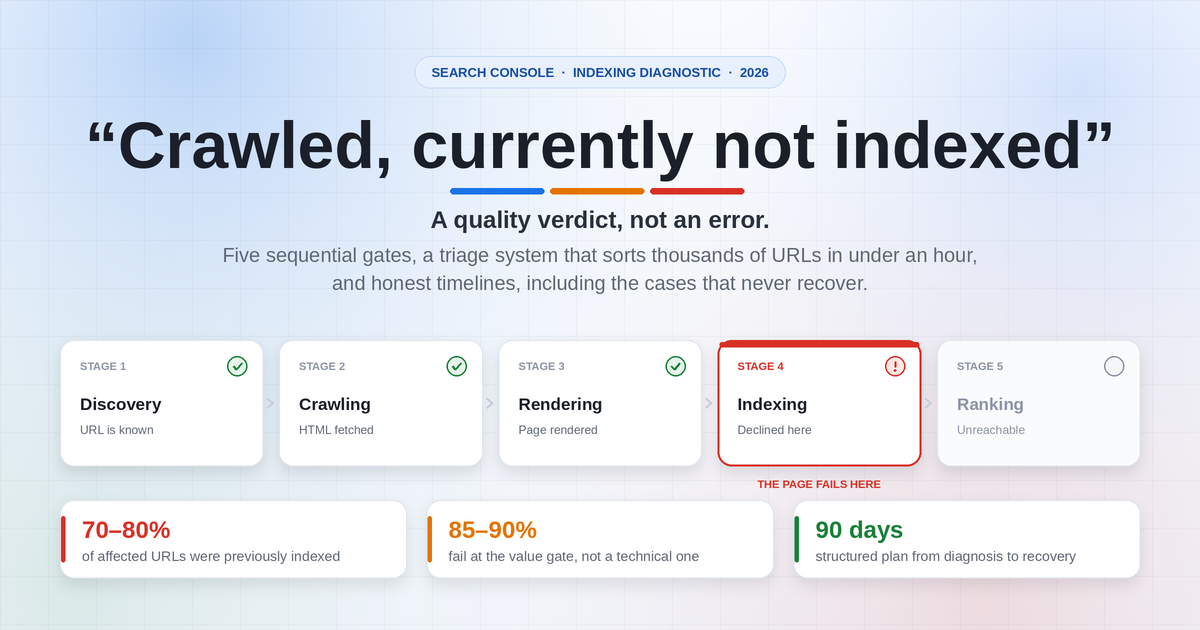
This guide separates them. You get a five-gate diagnostic framework created for this article that pinpoints where a URL is most likely failing, a triage system that sorts thousands of URLs in under an hour, a differential-diagnosis table that maps symptom patterns to likely causes, and honest observation windows including the cases that never recover.
It is built on Google's official documentation, public statements from Google's Search Relations team through July 2026, third-party commercial indexing research covering roughly 1.7 million monitored URLs on 18 customer websites, and recurring patterns reported by site owners on Reddit, Quora, and the Shopify and Google Search Central forums.
Google's definition, from the Page indexing report documentation linked above, is deliberately non-committal:
"The page was crawled by Google but not indexed. It may or may not be indexed in the future; no need to resubmit this URL for crawling."
Three things are worth pulling out of that sentence.
"Crawled" means Googlebot fetched the URL. It does not confirm that Google successfully loaded every resource, completed rendering, or evaluated the complete page. Rendering is a separate step that can be delayed or fail, and Google's JavaScript SEO documentation is explicit that important content should be present in the rendered HTML and accessible to Googlebot rather than assumed. The status confirms Google saw something. It does not confirm Google saw what your visitors see. That distinction is one of the most valuable diagnostics in this guide.
"Not indexed" describes a current state, not a permanent one. The crawl completed. At the end of the pipeline, the URL was not added to the index at this time.
"No need to resubmit" is Google stating that the resubmit button is not the lever most people assume it is.
Every URL travels through several stages:
Discovery → Crawling → Rendering → Indexing → Ranking
              ↑                        ↑
        "Discovered –            "Crawled –
     currently not indexed"   currently not indexed"
        reported here            reported here
A URL with this status was discovered and crawled. Whether rendering completed successfully is something you have to verify separately, not something the status confirms. What is certain is that the URL is not in the index right now, and an unindexed page cannot rank or receive impressions in Google Search.
Indexing is not free. Google stores, refreshes, and serves from a finite index, and the evaluation of a given URL is comparative rather than absolute.
In the July 2026 Search Off the Record episode on reading the indexing report, John Mueller described this directly: when a great deal of comparable material already exists, he questioned what value a further version of the same coverage adds to the index. He framed the consideration as what the index gains by including a page, rather than simply whether the page is good.
That framing explains why many site owners are baffled. They run their page against every quality checklist, it passes, and it still does not get indexed. Being comparable to what already ranks may not be sufficient on its own.
Treat this as one plausible contributing factor among several, not as a confirmed reading of your specific URL.
Here is a finding most guides on this topic miss, and it changes how you read your report.
Indexing Insight, a commercial indexing-monitoring product that tracks status at scale through Google's URL Inspection API, reported in its analysis of the Page indexing report that across roughly 1.7 million monitored pages on 18 customer websites, 70% to 80% of URLs carrying the "crawled – currently not indexed" label had previously been indexed by Google.
Important scope caveats: this is third-party commercial research on a specific customer dataset, not a Google-wide benchmark. Those 18 sites may not represent all websites. Treat the finding as directional rather than universal, and do not assume the same proportion applies to your site.
Within that dataset, the affected URLs were largely not pages waiting in line. They were pages Google had indexed and later removed.
Search Console does not separate these two situations. Both display the identical status string, and they can call for different responses.
| Crawled, no confirmed Search history | Crawled, previously appeared in Search | |
|---|---|---|
| What likely happened | Crawled; no evidence it was ever indexed | Appeared in Search results, then dropped out |
| Performance history | No impressions recorded in the last 16 months | Has impressions or clicks in the last 16 months |
| Typical profile | New pages, thin pages, programmatic pages, canonicalised variants, non-HTML files | Established pages, often former traffic drivers |
| Plausible causes | Never met the threshold for inclusion | Competing content improved, the page decayed, canonical selection changed, or crawl frequency lapsed |
| Urgency | Low to medium | High; you are losing traffic you previously had |
| Recovery odds | Moderate, with genuine improvement | Often lower; usually requires substantive change, not a date-stamp refresh |
| Diagnostic advantage | Limited baseline to compare | You have a before-and-after. Use it. |
Impressions greater than zero confirm the URL appeared in Google Search during that window, per Google's Performance report documentation. Tag it RECOVERY.
Zero impressions do not prove the URL was never indexed. An indexed page can sit in the index without receiving impressions, particularly if it never ranked well enough to be seen. Tag it UNCONFIRMED, and treat URL Inspection and the Page indexing report as your primary indexing checks rather than impression data.
At scale, pull the Search Analytics API for a 16-month window, aggregate impressions by page, and left-join against your filtered Search Console export on the full URL.
Framework #1 (author-created): The Deindexation Audit. Run the 16-month impression check across your entire affected list, not as spot checks. Then sort by peak historical impressions, descending. URLs at the top of that sorted list are your highest-value recovery candidates and are worth prioritising. Most people work this list in whatever order Search Console exported it, which is close to random. This is a prioritisation heuristic, not a Google-defined process.
For any RECOVERY page, pull the version from the Wayback Machine at the date it was last performing well and diff it against today. Content gets thinned by CMS migrations, plugin changes, template edits, and well-meaning "SEO refreshes" more often than teams expect.
These three statuses describe different points in Google's processing of your URL.
| Status | What happened | What it suggests | Concern level |
|---|---|---|---|
| Submitted and indexed | Crawled and indexed | Currently included | n/a |
| Crawled – currently not indexed | Fetched, not currently indexed | Google has the URL and has processed it at least once | Medium to High |
| Discovered – currently not indexed | Known but not yet fetched | Often crawl scheduling, server capacity, weak internal link prominence, or sitewide quality doubt | Medium |
| URL is unknown to Google | Not in Google's records | Google has no record of the URL | Highest |
The key difference: Discovered means Google has not fetched the URL yet. Crawled means it has. They usually call for different investigations, and crawl-scheduling remedies applied to a "Crawled" URL often produce nothing, because the crawl already happened.
Crawl-budget management is mainly a concern for very large or rapidly changing sites. Google's large-site crawl-budget guidance describes sites with roughly one million or more unique pages with content that changes about weekly, or medium-sized sites of roughly 10,000 or more unique pages with daily-changing content. Google's November 2022 office-hours explanation covers the same distinction. Smaller sites are less likely to face crawl-budget constraints, but "less likely" is not "never," and server responsiveness still affects crawling at any size.
A costly misreading: people see "Discovered," assume a discovery problem, and build more sitemaps and more internal links. In Indexing Insight's customer dataset, 94% of URLs the URL Inspection tool reported as "URL is unknown to Google" were grouped under "Discovered – currently not indexed" in the Page indexing report. Within that dataset, many URLs in the Discovered bucket were not queued for crawling at all. Again, this is one commercial dataset, not a universal rule.
Rule of thumb: movement from unknown → discovered → crawled – currently not indexed → indexed is progress, even when the label still reads like a failure. A page moving from "Discovered" to "Crawled – currently not indexed" is a positive sign. Google went and looked.
If you have both statuses in volume, examine "Crawled" first, since sitewide factors can affect both.
Getting indexed used to be closer to automatic. Several data points suggest it is more selective now. Read the scope column carefully; most of this is third-party research on limited datasets.
| Finding | Source and scope | What it may mean for you |
|---|---|---|
| In May 2025, over 25% of monitored pages were removed from Google's index, the highest deindexing rate the researchers had recorded | Indexing Insight, its own monitored customer URLs. Commercial third-party research, not a Google benchmark | Deindexation appears to be a routine event on the monitored sites |
| 88% of not-indexed pages were classified as quality-related rather than technical | Indexing Insight indexing study, ~1.7M pages across 18 customer sites. Note: its "quality" classification is partly inferred from observed indexing behaviour, so it is not an independent measurement of page quality | Technical checks are quick, but they may not explain most cases |
| 70% to 80% of "crawled – currently not indexed" URLs had previously been indexed | Indexing Insight, same 18-site dataset | On those sites, the status often reflected removal rather than a queue |
| Pages not crawled in 130+ days were very unlikely to be indexed | Indexing Insight, 1.4M pages across 18 customer sites. An observed threshold in that dataset, not a Google rule or guaranteed cutoff | Crawl recency may be a usable early-warning proxy |
| Mass "crawled – currently not indexed" can accompany sitewide quality doubt, with undifferentiated AI-generated content named as an example | John Mueller, Search Off the Record, July 16, 2026 | Page-level fixes may underperform where a sitewide pattern exists |
| Google is looking for content offering personal experience and knowledge others do not have | Marie Haynes's attendee notes from Google's 2026 Toronto Search Central Live event; not an official transcript or recording | Accurate and comprehensive may not be differentiating on its own |
| Studies have measured lower click-through rates to top-ranked results when AI Overviews are present | Ahrefs and an independent field experiment, 2025 | Click value of a ranked position may be lower. This does not establish anything about indexing thresholds |
Two forces are frequently cited by practitioners:
The practical takeaway, stated as the author's interpretation rather than Google policy: inclusion in the index is not automatic, and pages that do not clearly add something can sit in this status indefinitely.
The following five-gate model is a practical troubleshooting framework created for this article. It organizes common indexing causes but is not an official Google model. Google has not published these five gates, and does not state that it evaluates URLs in this exact order. Use it as a checklist sequence, not as a description of Google's internal systems.
The logic is that the cheapest, most objectively testable causes should be eliminated before the expensive, subjective ones.
| Gate | The question you are answering | How to test it | If it fails | Author's suggested observation window |
|---|---|---|---|---|
| 1. Access | Can Googlebot fetch this URL reliably? | curl -I, Crawl Stats, verified server logs | Fix status codes, redirect chains, 5xx/429, CDN or bot blocks | Days to a few weeks |
| 2. Permission | Is indexing allowed? | URL Inspection → "Indexing allowed?"; check HTTP headers | Remove noindex meta tag or X-Robots-Tag header | Days to a few weeks |
| 3. Render | Does the rendered page contain the main content? | URL Inspection → Test Live URL → View Tested Page → Screenshot | Unblock resources, server-render, address soft-404 signals | A few weeks |
| 4. Representation | Is this URL the one Google would select? | Compare user-declared vs. Google-selected canonical | Consolidate, canonicalise, redirect, repoint internal links | Several weeks |
| 5. Value | Does this URL add something the index does not already have? | The Delta Test (below) plus historical performance | Rebuild with genuine information gain, or retire | Several months, or never |
Gates 1 to 4 are cheap, fast, and objectively testable. Gate 5 is expensive, slow, and subjective.
In the author's experience auditing affected URL sets, a minority fail at gates 1 to 4 and the majority do not resolve to a clear technical cause. No published figure quantifies this split across the web, so treat it as an operating expectation rather than a statistic. Run gates 1 to 4 regardless: they take minutes for a whole template, and finding a failure there saves months of content work.
It is also why many people who "fix" their technical setup see nothing change. There may have been no technical fault to fix.
START: A URL is stuck in "Crawled – currently not indexed"

│
├─ Is it a feed, tag archive, parameter, filter, pagination,
│  or other URL you never wanted indexed?
│     └─ YES → IGNORE. Consider noindex if you never want it eligible
│              (this recategorizes the URL in reports; it does not
│              remove it from reporting). Stop here.
│
├─ GATE 1: Does it return a stable HTTP 200?
│     └─ NO → Fix server/redirect/CDN issue. Stop here.
│
├─ GATE 2: Does URL Inspection say "Indexing allowed: Yes"?
│     └─ NO → Remove noindex (check HTTP headers too). Stop here.
│
├─ GATE 3: Does the live render screenshot show your main content?
│     └─ NO → Rendering fault. Unblock resources / server-render. Stop here.
│
├─ GATE 4: Does Google's selected canonical match yours?
│     └─ NO → Duplication. Consolidate and repoint internal links. Stop here.
│
├─ GATE 5a: Has it had impressions in the last 16 months?
│     ├─ YES → RECOVERY case. Diff against the Wayback version.
│     │         Something changed: your page, the competition, or the
│     │         signals Google is weighing.
│     └─ NO  → UNCONFIRMED. No Search history recorded; this does not
│               prove it was never indexed. Verify with URL Inspection.
│
└─ GATE 5b: Run the Delta Test. Score it out of 12.
      ├─ 10–12 → Add relevant internal links, request indexing once, wait.
      ├─ 4–9   → Add the specific missing element (data, experience, examples).
└─ 0–3 → Commodity content. Rebuild from a different angle, or retire it.A common mistake is assuming every affected URL should be indexed. Google's Page indexing documentation states that site owners should not expect 100% of their known URLs to be indexed. Generally, only canonical pages with search value need inclusion.
Sort every URL in the report into one of four buckets before touching a single page.
| Bucket | Signal | Action | Effort |
|---|---|---|---|
| 🟦 Expected | /feed/, ?replytocom=, pagination, tag and author archives, faceted or filtered URLs, non-canonical variants, internal search, login/cart/thank-you pages | Leave alone. Consider noindex only if you never want the URL eligible for Search. Note that noindex does not clean a URL out of Search Console reporting; it usually changes how the URL is categorized | None |
| 🟥 Technical | Live render shows missing or empty main content; blocked resources; X-Robots-Tag: noindex; soft-404 signals; intermittent 5xx | Fix immediately. Usually the highest return in the report | Low to Medium |
| 🟨 Duplicate | Near-identical to another URL; conflicting canonical signals; variant and parameter sprawl | Consolidate: canonicalise, merge, or 301 | Medium |
| 🟩 Value | Renders fine, unique URL, genuinely intended to rank, still unindexed | Rebuild or retire. The hard one | High |
A note on PDFs: Google can index PDFs, so do not exclude a file simply because it is a PDF. Exclude a PDF when it is intentionally duplicated by a preferred HTML version, obsolete, private, low-value, or not intended for Search. If both an HTML page and a PDF should exist, clarify their distinct roles and link to the preferred version consistently.
Two rules govern this matrix.
Rule 1: Never conclude a usefulness problem before eliminating technical ones. A July 2026 case reported by practitioners saw an entire site land in this status after a migration. The reported cause was one line in robots.txt, Disallow: /?, intended to block tracking parameters, which also blocked the theme's CSS and JavaScript because those loaded through parameterised URLs. Googlebot was rendering a heading and some boilerplate. Content improvement would not have addressed that.
Rule 2: The Expected bucket is usually the biggest, and it is not necessarily a problem. If your report shows 40,000 URLs and 37,000 are feeds and pagination, your actual problem may be 3,000 URLs. Many people react to the headline number and never reach the real list.
| Usually should be indexed | Usually does not need indexing |
|---|---|
| Original articles and guides | RSS and CMS feed URLs |
| Core service and money pages | Internal search results |
| Useful product and category pages | Empty or single-item tag/category archives |
| Location pages with genuinely distinct information | Print and AMP-style duplicate versions |
| Tools, calculators, reference tables | Login, account, cart, checkout, thank-you pages |
| Public documentation | Tracking and UTM parameter URLs |
| Videos with dedicated watch pages | Sort and filter combinations |
| Forum threads with substantive answers | Duplicate product variants (size, colour) |
| Thin media attachment pages | |
| Pagination with no independent search purpose | |
| Staging and development URLs | |
| Expired listings with no continuing value |
Then map each situation to an action:
| Page situation | Recommended action |
|---|---|
| Important, unique page | Diagnose through the 5 gates, improve, request indexing once |
| Useful page that duplicates another URL | Merge, redirect, or canonicalise |
| Necessary for users, not for search | Keep accessible; consider noindex |
| Obsolete with a close replacement | 301 redirect |
| Removed with no replacement | Return 404 or 410 |
| Feed, parameter, or system URL | Exclude from sitemap, control discovery |
| Report says excluded, URL Inspection says indexed | No fix needed; the report can lag |
Framework #3 (author-created): Valuable Page Index Rate (VPIR). This is an internal prioritisation tool, not a validated Google metric, and its thresholds do not predict Google's indexing decisions. Track it alongside the raw count:VPIR = (indexed canonical pages you intend to rank) ÷ (total canonical pages you intend to rank) × 100The denominator excludes every feed, filter, archive, and utility URL, so you are measuring indexation of pages you actually want in Search.
The bands below are suggested internal prioritisation ranges chosen by the author. They are starting points for triage conversations, not evidence-based cutoffs. Calibrate them against your own site's history before treating any number as meaningful.
| VPIR | Suggested interpretation | Suggested action |
|---|---|---|
| High (roughly 95%+) | Likely healthy; residual cases often new pages in transit | Monitor only |
| Good (roughly 85–94%) | Common for larger or older sites; check whether the gap concentrates in one template | Template-level review |
| Watch (roughly 70–84%) | Worth investigating; often duplication or a weak content tier | Consolidate and prune |
| Escalate (below roughly 70%) | Investigate sitewide patterns before individual pages | Prune and consolidate first |
Mueller's comments about sitewide quality are the reason for that last row: where a large share of intended-to-rank pages are unindexed, page-level work may underperform. Recompute VPIR on a regular cadence you choose, and adjust the bands using your own data.
Do not guess, and do not work URL by URL. Template-level problems affect every URL using that template, so test three to five representative URLs per template (blog post, product, category, landing page) rather than all of them.
table.csv from the zipBucket column and strip out expected patternsPatterns worth filtering first:
/feed/          /page/          /tag/           /author/
?replytocom=    ?utm_           ?s=             /wp-json/
?orderby=       ?filter_        ?color=         ?size=
.xml            .json           /search
Do not blanket-filter .pdf; see the PDF note above.
Two limitations of this report:
Google's URL Inspection documentation distinguishes two things that people routinely conflate:
A successful live test does not prove the URL will be indexed. The live test does not evaluate every indexing, duplication, canonical-selection, or quality signal. When the aggregate report and the per-URL tool disagree about a specific URL, the per-URL tool is the better reference, but read the Google Index panel and the Live Test panel as answering two different questions.
Check the last crawl date for each priority URL.
The table below summarises observations from Indexing Insight's customer dataset (1.4 million pages across 18 sites). These are correlations within one commercial dataset, not Google rules, guaranteed cutoffs, or thresholds Google has published. Low crawl frequency and non-indexing plausibly share common causes rather than one causing the other.
| Days since last crawl | Indexed rate observed in that dataset | Suggested response |
|---|---|---|
| 0–30 days | Very high | If it is unindexed and new, it may still resolve without action |
| 31–100 days | High, declining | Common for lower-priority pages. Monitor |
| 100–130 days | Declining noticeably | Consider intervening: refresh, re-link, confirm sitemap lastmod |
| 131–150 days | Falls sharply | Recovery is getting harder |
| 151+ days | Very low | Treat as likely deindexed |
| 190+ days | Trends toward "URL is unknown to Google" | Google appears to retain less about the URL |
Recently crawled pages on healthy sites sometimes index without intervention. Where a URL has been stuck across several crawls, a change in its signals is usually needed.
Run the 16-month impression check described earlier, remembering that zero impressions do not prove a URL was never indexed. Tag surviving URLs and sort RECOVERY URLs by peak historical impressions. That sorted list is your work queue.
This is the highest-value few minutes in the whole process.
If the answer is no, stop. You have found a problem to fix before considering anything else.
| Symptom in the render | Likely cause | Fix |
|---|---|---|
| Heading and boilerplate only | Blocked CSS/JS resources | Check More Info → Page resources for files Google could not load |
| Completely blank | Unclosed HTML tag or comment; JavaScript execution error | Validate the rendered HTML; check the JavaScript console messages tab |
| Loading spinner or skeleton | Client-side rendering that did not complete in time | Server-side render or pre-render critical content |
| Cookie or consent wall | Interstitial blocking content in the render | Ensure content is in the DOM behind the overlay |
Content inside an <iframe> | Iframe association with the parent page is not guaranteed | Google may associate iframe content with the embedding page, but this is not guaranteed. Critical primary content should not depend solely on iframe association. See Google's December 2023 office-hours explanation |
| Renders successfully but shows no meaningful content | Possible soft-404 signal | Restore useful primary content or return the correct status code |
On soft 404s specifically: Google may classify a page as a soft 404 when it returns a successful HTTP status but appears to be an error page, an empty page, or a page without meaningful primary content. Word count alone is not the deciding factor. Google's technical requirements cover the baseline a page must meet.
Also verify:
A page rendering correctly in your browser does not establish that Google rendered it the same way.
Check robots.txt for over-broad rules. Patterns that cause damage in practice:
Disallow: /*?*          ← blocks parameterised URLs, sometimes including theme assets
Disallow: /wp-content/  ← blocks CSS and JS on WordPress
Disallow: /assets/      ← same problem, different stack
Disallow: /*.js$        ← blocks JavaScript on JS-dependent sites
Google's robots.txt documentation makes the division of responsibilities clear:
robots.txt controls crawling.noindex controls whether a crawled page may be indexed.noindex, so blocking is not a reliable way to keep a page out of the index.robots.txt to remove an already indexed page from Search.noindex does not clean a URL out of Search Console reporting; it usually changes how the URL is categorized.Separately, a blocked resource can break the render of a page that is itself crawlable. That failure mode can produce large numbers of URLs in this status.
Check for X-Robots-Tag in the HTTP response. A noindex delivered via HTTP header does not appear in your page source and will not show up when you view source in a browser. A CDN can also be configured to serve it selectively.
Check it in URL Inspection → View Tested Page → More Info → HTTP Response, and look for:
X-Robots-Tag: noindexVerify the status code independently:
bash
curl -I https://example.com/affected-page/

# Follow redirects and see where you actually land:
curl -L -s -o /dev/null -w '%{http_code} %{url_effective}\n' \
  https://example.com/affected-page/
CMS plugins sometimes report a status that differs from what the server sends. Cross-check with an independent status checker.
Check for intermittent server errors:
Verify Googlebot before trusting your logs. User-agent strings can be spoofed, and a meaningful share of traffic claiming to be Googlebot is not. Google's Googlebot verification documentation describes reverse and forward DNS verification, and publishes IP ranges you can match against. Do this before drawing conclusions from crawl-frequency analysis.
Cross-check with Bing. Submit the URL to Bing Webmaster Tools. If Bing indexes the page and Google does not, basic public accessibility may be less likely to be the only problem. However, the difference does not identify Google's reason for excluding the URL. If neither engine indexes it, a technical cause becomes more plausible.
Duplication can produce this status, because Google does not always assign the dedicated "Duplicate" statuses. Near-duplicates sometimes land here instead.
Check: URL Inspection → Page indexing section → compare User-declared canonical against Google-selected canonical. If they differ, Google has selected a different representative URL. Canonical tags are signals, not directives.
Per Google's canonicalization documentation:
rel="canonical" is a strong signal.Google does not publish an exact ranked ordering of every signal, so do not treat any such list as authoritative.
Where Google selects a different canonical, the remedy is often not the canonical tag itself but the surrounding signals, especially internal links. If you declare page A as canonical while your internal links overwhelmingly point to page B, align the links.
Non-obvious near-duplication to check for:
Google's guidance is direct that creating many pages primarily for search engines is a spammy practice, and pages competing for the same purpose can behave as duplicates even when the text is not identical.
Search Console → Links → Internal links, or crawl your site with a crawler.
There is no published minimum number of internal links or maximum click depth that Google requires. Relevance, placement, anchor context, and the importance of the linking page matter more than any numeric target. Treat link counts as a comparative diagnostic across your own site, not as a threshold.
Now stop looking at individual URLs. The pattern across affected URLs is more informative than any single one.
Framework #4 (author-created): Symptom fingerprints. No single symptom identifies a cause. Combinations narrow the field. Find the row matching your observations to get a working hypothesis, which you then test. These are starting hypotheses, not confirmed diagnoses.
| Affected URLs look like… | Search history | Render test result | Working hypothesis | First action |
|---|---|---|---|---|
| Mostly feeds, tags, filters, pagination | None recorded | Clean | Likely nothing to fix | Filter the report. Stop |
| Clustered in one template (all product variants, all city pages) | Mixed | Clean | Template-level duplication | Canonicalise or consolidate the template |
| Clustered in one template | None recorded | Empty or partial | Template rendering fault | Fix the template, not the content |
| Sitewide spike right after a redesign or migration | Previously in Search | Empty or partial | Robots.txt or rendering regression | Audit robots.txt for blocked assets |
| Sitewide spike after a migration | Previously in Search | Clean | Content thinned in migration, or canonical/redirect regression | Diff against Wayback Machine |
| Random mix including strong pages, count growing | Mostly previously in Search | Clean | Possible sitewide quality pattern | Investigate pruning and consolidation before page-level work |
| Individual older articles, gradually accumulating | Previously in Search | Clean | Content decay plus improving competition | Rebuild top pages by historical impressions |
| Almost everything on a recently launched site | None recorded | Clean | Limited established signals | Publish fewer, stronger pages; earn a few genuine external links |
| One important page, everything else fine | None recorded | Clean | Weak internal linking or intent overlap with an existing page | Add relevant internal links; check for cannibalisation |
| High-volume recently published pages | None recorded | Clean | Possible commodity content at scale | Pause publishing. Prune, then rebuild selectively |
| Pages indexed briefly, then dropped | Previously in Search | Clean | Reevaluation, different canonical selection, or changing page and site signals. Search Console does not reveal the exact reason | Compare current page against the previously performing version |
| Google-selected canonical differs from yours | Either | Clean | Canonical selection difference | Repoint internal links to the preferred URL |
| Bing indexes it, Google does not | Either | Clean | Basic public accessibility is less likely to be the only problem; the reason for Google's exclusion is not identified | Work gates 4 and 5 |
| Neither Bing nor Google indexes it | Either | Any | Technical cause is more plausible | Re-run gates 1 to 3 carefully |
If the page returns 200, is indexable, renders correctly, has a clean canonical, and is genuinely unique, page-level usefulness and redundancy become the remaining plausible factors. This is the honest, difficult part of the topic. Note throughout that these remain hypotheses; Search Console does not confirm them for any individual URL.
John Mueller, Search Off the Record, "How to read the Indexing Report" (July 16, 2026), described the sitewide effect: where Google's systems have serious concerns about a website's overall quality, they will reduce the number of pages they index, because spending significant crawling and indexing effort on a site they have strong concerns about makes little sense to those systems. He said this typically results in both less crawling and less indexing.
On how to respond, Mueller advised against treating these situations primarily as technical problems. Where a site shows a broad pattern of pages not being indexed and no technical explanation exists, he suggested stepping back to consider quality across the site rather than debugging individual URLs.
Martin Splitt, in the same episode, widened the definition of quality past the text. He described pages where the text is technically present but is hidden behind ads, interstitials, moving elements, or filler content, and said the full experience of the page has to be taken into account because that is what users encounter.
According to Marie Haynes's attendee notes from Google's 2026 Toronto Search Central Live event, a Google presenter described crawling as downloading the page, with inclusion in a database following only if the content is judged useful. The notes report the presenter giving two reasons a crawled page might be excluded, a technical issue or an assessment that the page was not good, and noting that where large numbers of pages cover an identical topic, Google may determine a given page is unlikely to be useful in Search. Because these are attendee notes rather than an official transcript or recording, treat the specifics as second-hand paraphrase. Google's official announcement of the Canada 2026 event confirms the event itself.
A recurring finding in published case reviews is commodity content: material that competently restates what already exists, that many people could produce on the subject.
Haynes's July 2026 analysis of pages stuck in this status puts it directly:
"These pages are usually not junk. They're good, decent articles — as good as the pages that Google is ranking. And that's just the point. The pages aren't special or any more valuable than what currently exists."
This is one experienced practitioner's assessment of the cases she reviews, not a Google statement about your URL. It does help explain why quality checklists can mislead: your page passes them, and so do the pages already indexed.
Framework #5 (author-created): The Index Value Equation. This is a mental model, not a formula with measurable inputs and not anything Google has published. Do not treat it as computable:Marginal index value ≈ (unique information × real search demand) ÷ (redundancy × serving cost)Its only practical use is to focus attention on three levers you control: increase unique information, target demand that is genuinely underserved, or reduce redundancy by consolidating your own overlapping pages. Adding words to a page changes none of them.
This is an author-created scoring rubric for prioritisation. The scores have no relationship to any Google system.
Score each question 0, 1, or 2.
| # | Question | 0 points | 1 point | 2 points |
|---|---|---|---|---|
| 1 | Does this page contain information that exists nowhere else? | Nothing original | A few original examples | Original data, research, or testing |
| 2 | Could a competent writer with an LLM produce this in an hour? | Yes, easily | Mostly, with effort | No; requires access or experience they do not have |
| 3 | Does it demonstrate first-hand experience? | No | Implied | Explicit, specific, verifiable |
| 4 | What does the AI Overview for this query already say? | Everything on my page | Most of it | It misses the substance of my page |
| 5 | Is the content easy to consume? | Buried under ads, filler, interstitials | Some friction | Clean, fast, content-first |
| 6 | Is the intent match exact? | Wrong format for the query | Roughly right | Exactly the format searchers need, answered in the first screen |
Scoring (author's suggested prioritisation bands):
| Score | Reading | Suggested action |
|---|---|---|
| 10–12 | Differentiated | Add relevant internal links, request indexing once, then wait |
| 7–9 | Borderline | Add the specific missing element |
| 4–6 | Weak differentiation | Substantial rebuild, or merge into a stronger page |
| 0–3 | Commodity content | Rewriting is unlikely to help. Rebuild from a different angle or retire it |
Open the query your page targets. Expand the AI Overview. Read it. Now read your page.
If your page says roughly what the AI Overview says, consider what a searcher gains by clicking through to read the same thing again.
On the measured effects: Ahrefs' click-through-rate analysis found lower clicks to top-ranked results when AI Overviews are present, and an independent randomised field experiment measured a substantial reduction in publisher clicks.
Important boundary: these studies measure click-through rates. They do not show that Google has raised its indexing threshold, and they do not establish that AI Overviews cause more pages to be excluded from the index. Any connection between the two is the author's inference, offered as a hypothesis about why differentiation matters more than it used to, not as a documented mechanism.
Vague advice to "improve quality" is not actionable. More concrete additions:
One genuinely original section is worth more than added filler. Do not invent experience, tests, statistics, or expertise; show how the information was created and cite reliable sources.
Following Splitt's point, audit the page as a user experiences it:
Google's page experience guidance frames Core Web Vitals and page experience as contributors to overall search success. Passing Core Web Vitals does not guarantee indexing, and failing them does not automatically cause exclusion. Google does not use a single page-experience signal as a universal indexing gate.
Google does not exclude content from indexing simply because AI helped produce it, and AI-generated content is not automatically disqualified. Google's guidance on generative AI content and its helpful-content guidance focus on usefulness, originality, purpose, accuracy, and compliance with spam policies rather than production method. Scaled content created mainly to manipulate rankings can violate spam policies regardless of whether a human or a machine produced it.
In the July 2026 episode, Mueller made a related point about perception: if most of a website is AI generated and visitors can tell, they may conclude there is nothing unique or valuable available to them there.
Review AI-assisted or programmatic pages for:
Framework #6 (author-created): The "Anyone Could Have Written This" prompt. Before publishing, paste your draft into an LLM and ask: "Is this likely to be considered commodity content? What in here could only have been written by someone with direct experience of this subject?" If the answer to the second half is "nothing," you have a signal worth acting on. Follow up with: "Give me 20 ideas that draw on my first-hand experience to make this substantially better than anything else on this topic."This is a pre-publication filter, not a recovery tactic, and it is cheaper than recovery.
Established sites appear to get more latitude. A page on a domain with strong brand signals and a long track record may be indexed on material that would not be indexed from a newer site. This is a widely reported practitioner observation rather than documented Google policy, and it means benchmarking your content against what large publishers publish can mislead you.
Work these in order. "Request indexing" is deliberately last.
Cheapest work available, and the most objectively verifiable.
noindex directives, including X-Robots-Tag headers set at the CDNIf two similar pages genuinely both need indexing, they need different purposes and meaningful differences. Changing only the city name, product colour, target keyword, H1, meta title, intro paragraph, or a few synonyms is unlikely to be sufficient. There is no published percentage of difference that qualifies; the test is whether the main content satisfies a different need.
Two location pages that legitimately deserve separate indexing might differ in service availability, local regulations, area-specific examples, original photography, local pricing or delivery terms, genuinely different FAQs, distinct contact details, and verifiable local expertise.
Google's crawlable-links documentation explains that Google generally discovers links when they are standard HTML <a> elements with resolvable href attributes:
html
<a href="https://example.com/affected-page/">Descriptive anchor text</a>Avoid: links that only appear after a user action, links routed through unnecessary redirects, generic anchors used everywhere, links to parameter versions instead of canonical URLs, and mass irrelevant linking intended to manipulate importance.
There is no required number of internal links and no universal click-depth rule. Relevance, placement, anchor context, and the importance of the linking page matter more than hitting a numeric target. Site owners informally report stuck pages indexing after receiving links from established pages, but internal links do not rescue a duplicate, empty, or commodity page.
Use the Delta Test to identify what is missing, then add exactly that. Also:
Where affected counts run high, run a full content audit.
noindex (for necessary-but-unsearchable pages), or delete + 410This feels counterintuitive. It follows from Mueller's point that sitewide quality concerns can reduce how much of a site Google crawls and indexes.
For newer or lower-authority domains, on-site work alone may not be enough. A few relevant mentions from industry directories, a guest contribution, a supplier or partner link, or genuine PR can support discovery and provide external signals.
Understand the limit: external links can raise a page's apparent importance without changing how Google assesses the content itself.
Google's sitemap documentation is clear that a sitemap supports discovery and provides a canonicalization hint. It does not guarantee crawling or indexing.
Include: canonical, publicly accessible, 200-status, indexable URLs you want in Search, on the preferred protocol and hostname.
Remove: redirects, 404s and 410s, noindex pages, duplicate parameter URLs, feeds, internal search results, non-canonical variants.
Use <lastmod> only when the page has changed substantially:
xml
<url>
  <loc>https://example.com/affected-page/</loc>
  <lastmod>2026-07-27</lastmod>
</url>
Do not auto-update every date daily. Google uses lastmod when the values are consistently accurate and reflect significant changes.
Google applies limits to manual indexing requests but does not publish a universal per-day allowance, so treat any specific number you see quoted as unverified. Repeated submission does not guarantee indexing. Do not confuse manual request limits with API quotas: Google's Search Console API limits documentation documents up to 2,000 URL inspection requests per property per day and 600 per property per minute.
Do not misuse the Indexing API. Google's Indexing API documentation limits it to pages containing either JobPosting or BroadcastEvent embedded in a VideoObject. It is not a general indexing tool for ordinary articles, products, categories, or landing pages.
The ranges below are the author's suggested workflow checkpoints, based on observed cases. They are not Google guarantees, and Google publishes no timeline for indexing decisions. Indexing may occur quickly, take several weeks, or not occur at all if Google continues to exclude the URL. Recheck after a practical observation period based on your site's crawl frequency and size.
| Scenario | Author's typical observed range |
|---|---|
| Healthy site, new page in temporary limbo | Days to a couple of weeks, often without action |
| Technical fix (rendering, robots, headers, status codes) | A few weeks, from the next crawl |
| Canonical and duplicate consolidation | Several weeks as Google recrawls the section |
| Page-level rebuild plus internal links plus one request | Several weeks to a couple of months |
| Template-level fix across a section | One to two months |
| Sitewide quality work (pruning, E-E-A-T, authority) | Several months |
| Newer domain building signals | Several months of accumulating signals |
| Genuine commodity content, lightly edited | Often no recovery. Rebuild or retire |
Mueller has said that quality reprocessing often takes several months. Haynes's assessment is blunter: for most sites with a large number of pages stuck in this status for quality reasons, recovery will be difficult.
Judge trends over periods you set in advance rather than reacting daily.
Everything above is reactive. You discover a page is unindexed after it is already gone.
Crawl recency lets you observe declining crawl frequency while the page is still indexed and still earning traffic.
Framework #7 (author-created): The 100-Day Alert. Treat days-since-last-crawl as a leading indicator. The 100-day trigger is a threshold the author selected to sit inside the range where Indexing Insight observed indexed rates declining in its dataset. It is not a Google rule and not a validated cutoff. Adjust it using your own site's crawl patterns.
How to build it:
lastCrawlTime for your important URLs via the URL Inspection API, within the documented quotalastmodRemember that low crawl frequency and non-indexing plausibly share common causes. Treating crawl recency as a proxy is useful; treating it as the mechanism is not supported.
| Problem | Fix |
|---|---|
/feed/ URLs in the report | Expected. Filter them out |
| Tag, category, and author archives with one or no posts | noindex, or consolidate into a handful of genuinely useful hubs |
| Media attachment pages | Disable attachment pages or redirect to the parent post |
| Date archives duplicating category archives | noindex |
| Short posts with no original angle | Merge into comprehensive guides; 301 the old URLs |
| Roundups and listicles restating the SERP | Add original testing, data, or first-hand assessment, or retire them |
| Old posts dropping out of the index | Substantive updates, not date-stamp refreshes; re-link from current content |
Plugin-generated canonicals or accidental noindex settings | Audit your SEO plugin's indexing defaults per post type |
| High-volume AI-assisted publishing | Slow down and prune |
Not every WordPress URL reported as unindexed needs correcting. Feeds and thin archives usually have no independent search purpose.
| Problem | Fix |
|---|---|
| Manufacturer descriptions used verbatim across the web | Rewrite with genuine detail: sizing notes, use cases, comparisons, real photography |
| Variant URLs (size, colour) | Canonicalise to a parent product page |
| Faceted navigation URL sprawl | noindex or block filter combinations; index only high-demand facets |
| Thin category pages that are just a product grid | Add real buying guidance above or below the grid |
| Out-of-stock products dropping out | Keep the page live with alternatives, restock date, specifications, and reviews. Do not 404 it |
| Discontinued products | 301 only when a genuinely relevant replacement exists. Do not redirect everything to the homepage |
| Products reachable through several category paths | Pick one canonical path and link consistently |
Duplicated manufacturer descriptions are among the most frequently cited catalysts for e-commerce indexing problems in practitioner case reports. Where thousands of product pages differ only by a row in a specs table, differentiation is minimal.
Check whether your location pages differ only by city name.
Make them genuinely distinct with: services actually available in that area, local contact details and service boundaries, original project photos and case studies, area-specific regulations or requirements, verified local testimonials, local pricing or response times, and FAQs reflecting real questions from that market.
If you cannot supply meaningful differences, a strong regional hub page may outperform a large set of near-identical city pages.
Check: server-rendered HTML output, hydration failures, API availability at render time, client-side canonical tags, route status codes, content hidden behind interaction, differences between desktop and mobile output, and blocked scripts or styles. Rendering can be delayed or fail, so important content should be present in the rendered HTML rather than assumed.
noindex empty, unanswered, or unmoderated pagesSlower indexing on a new domain is commonly reported. There is no domain-age threshold at which behaviour changes, so treat any specific age cutoff you see quoted as unsupported.
lastmod valuesAt large scale, some URLs in this status is common. Google indexes a subset of most large sites.
Focus on the composition of the affected set, particularly whether money pages appear in it, and on the trend rather than the absolute number.
Commonly one of:
noindex or canonical left over from a "coming soon" or staging setupCheck URL Inspection first, verify the rendered HTML contains your content, and give a new site a reasonable observation period.
If most important pages are excluded, investigate:
noindex settings (check the "discourage search engines" toggle on WordPress)<div> click handlers instead of <a> elements)Plausible triggers:
Compare the current page against the version from when it performed, the previous traffic curve, the Google-selected canonical, and the last crawl date.
A URL that appears briefly and later drops out may have been reevaluated, canonicalized differently, or affected by changing site and page signals. Search Console alone does not reveal the exact reason. Do not assume it was tested against user engagement data; that is not something Search Console reports or Google has documented for this status.
JobPosting and BroadcastEvent in a VideoObject. Using it for general pages is against documented policy.noindex, an empty render, or a canonical pointing elsewhere.noindex to pages you want indexed, to make the report look better. This formalises the exclusion. It also does not remove the URL from reporting.Two more worth naming: adding structured data as an indexing fix (valid markup affects rich-result eligibility, not basic indexing), and removing canonical tags to "let Google decide" (canonicals help Google understand duplicate relationships; change one only when it is wrong).
The day ranges below are workflow checkpoints selected by the author, not periods after which Google acts.
X-Robots-Tag on each affected templatenoindex directives, including CDN-level headerslastmod; remove non-canonical URLsnoindex or consolidate bucket 1–2 URLs where appropriate| Tool | Use |
|---|---|
| Search Console: URL Inspection | Per-URL status (Google Index) and live test (current page) |
| URL Inspection API | Bulk status and lastCrawlTime, within documented quota |
| Search Analytics API | 16-month impression history |
| Search Console: Crawl Stats | Response codes, crawl frequency, host status |
| Bing Webmaster Tools | Cross-check basic accessibility |
| Independent status checker | Status code and redirect chain verification |
| W3C Validator | Catch unclosed tags that break rendering |
| Wayback Machine | Diff a decayed page against its previous version |
| Site crawler (Screaming Frog and similar) | Internal link depth, orphan pages, duplicate titles |
curl | Headers, status codes, redirect chains, bot-specific responses |
URL | Template | Gate Failed (1–5) | Bucket (Expected/Technical/Duplicate/Value)
| 16mo Impressions | Peak Month | Days Since Last Crawl | Renders OK? (Y/N)
| HTTP Status | Indexing Allowed? | User Canonical | Google Canonical
| Delta Test Score | Internal Links | Click Depth | Recommended Action
| Date Actioned | Status Now | Date Reindexed
Sort by 16-month impressions descending, filter to the Value bucket, and work top-down.
lastmod?X-Robots-Tag headerlastmod"Crawled – currently not indexed" reports a state, not a diagnosis. There is no universal trick that clears it, because the same label covers technical faults, canonical selection differences, and judgments about a page's usefulness.
Start by confirming the current status per URL rather than trusting the aggregate report. Decide whether the page should be indexed at all. Then walk the gates in order: access, permission, render, representation, value. A short technical pass either hands you a cheap fix or narrows the field.
For large sites, work patterns rather than individual URLs. Improve the page types that carry real demand, consolidate the duplicates, prune what has no path to being useful, and stop pushing low-value URLs through your sitemaps and internal architecture.
The most productive shift is from asking "how do I make Google index this page?" to asking "what does this page offer that the index does not already have?" That is a harder question, and answering it honestly is most of the work.
Googlebot crawled the URL, but Google has not added it to the searchable index at this time. Google may index it later, and resubmitting does not guarantee indexing. The page will not appear in Google search results while it is unindexed. It is not an error and not, by itself, a penalty.
It depends which URLs are in it. Feed URLs, pagination, parameter variants, and non-canonical URLs commonly appear there. Money pages and articles you need to rank are a real problem. Judge the report by its contents, not its count.
There is no universal number, and Google's documentation says not to expect 100% indexation. Composition matters more than count. Filter out expected URL patterns first, then track VPIR using bands you calibrate against your own site history.
Google publishes no timeline. Technical fixes often show movement within a few weeks of the next crawl; duplicate consolidation commonly takes longer; usefulness-driven cases can take several months, and some pages never recover. Recheck after an observation period based on your crawl frequency and site size.
It triggers a recrawl, not an indexing guarantee. For a page that has not changed, resubmitting is unlikely to change the outcome, and Google's documentation says there is no need to resubmit. Limits apply, but Google does not publish a universal manual-request allowance.
Sometimes. New pages on established sites do sometimes index without action. Pages that remain stuck across multiple crawls rarely index without a change in their signals.
No. A page must be in Google's index before it can appear in normal search results.
"Discovered" means Google knows the URL exists but has not fetched it, often crawl scheduling, server capacity, or internal linking. "Crawled" means Google fetched it and has not indexed it at this time.
On a newer or lower-authority site, delays are common. On an established site, a stuck post is often poorly internally linked, or covers ground already covered thoroughly elsewhere on the web or on your own site. Check both.
New domains have fewer established signals, and indexing tends to be incremental. Publish fewer and stronger pages, earn a small number of legitimate external links, and check the domain's history if you bought it.
No threshold exists. A short page with original data can be indexed while a long page restating the SERP is not. Word count is also not the deciding factor in soft-404 classification.
AI-generated content is not automatically excluded. Google focuses on usefulness, originality, purpose, accuracy, and spam-policy compliance rather than production method. Scaled content created mainly to manipulate rankings can violate spam policies whoever or whatever produced it. Mueller has named undifferentiated AI-generated content as an example of what can accompany sitewide quality concerns.
They can raise a page's apparent importance and support crawling, but they do not change how Google assesses the content. Links change priority, not the underlying assessment.
No. A sitemap supports discovery and provides a canonicalization hint, and these pages were already crawled. A clean sitemap is still worth maintaining.
Crawl budget is mainly a concern for very large or rapidly changing sites, at the scales described in Google's large-site guidance. It is also not the explanation for this status specifically, since the crawl already occurred. Server responsiveness still matters at any size.
Only if they genuinely should not rank: tag archives, internal search results, filter combinations, thin variants. Applying noindex to a page you want ranked formalises the exclusion, and it does not remove the URL from Search Console reporting.
Only after triage. Delete or noindex genuinely valueless pages, consolidate near-duplicates, and improve pages targeting real demand.
It may. Google has said sitewide quality concerns can reduce crawling and indexing, so removing genuinely weak pages is a reasonable step. This is a plausible mechanism, not a guaranteed outcome. Prune what has no path to being valuable; 410 or 301 as appropriate.
Search Console → Performance, 16-month range, filtered to the exact URL. Positive impressions confirm it appeared in Search during that window. Zero impressions do not prove it was never indexed, since an indexed page can receive no impressions. Use URL Inspection and the Page indexing report as your primary indexing checks.
Yes. The status it moves to is often "crawled – currently not indexed." Plausible triggers include a core or spam update, improving competition, your own content thinning through a migration or edit, or an extended gap since the last crawl.
A URL that appears briefly and later drops out may have been reevaluated, canonicalized differently, or affected by changing site and page signals. Search Console alone does not reveal the exact reason.
Indirectly at most. Severe server slowness can reduce crawl rate. Core Web Vitals and page experience may contribute to overall search success, but Google does not use one page-experience signal as a universal indexing gate: passing does not guarantee indexing, and failing does not automatically cause exclusion.
It can. Google does not always assign the dedicated "Duplicate" statuses, so near-duplicates sometimes land here. Compare user-declared against Google-selected canonical before concluding anything about content quality.
Structured data errors normally affect rich-result eligibility rather than basic indexing. Serious markup or template defects can indicate broader rendering problems, so fix them regardless. Adding schema is not an indexing fix.
Google's AI search features generally require a page to be indexed and eligible to appear in Google Search, as described in its AI features and your website guidance. Other AI products may use different indexes, retrieval systems, partnerships, or data sources, so do not assume every assistant depends on Google's index.
The URL Inspection tool and its API query Google's index directly for a given URL. The Page indexing report updates on a lag and samples on large sites. For a specific URL, prefer URL Inspection.
Services promising guaranteed or instant indexation typically either misuse the Indexing API or rely on link spam. Neither changes how Google assesses the page.
Written by
Writes about SEO, AEO and GEO
Rank Force is a content and search-optimization platform built for how people actually find answers today, through Google and through AI assistants like ChatGPT, Gemini, Perplexity, and Claude. Every article published here is researched against the top-ranking sources for its topic, drafted and cross-checked through a multi-model process, and put through a dedicated fact-checking and editing pass before it goes live. The result is writing that answers real questions clearly, shows its sources, and earns its place in both search results and AI answers.
Keep reading
Fix "Crawled – currently not indexed" in Google Search Console with a triage framework, bulk verification methods, root-cause fixes, and realistic timelines.
You published the page. Googlebot crawled it. The URL still is not in Google's index. That is what "Crawled currently not indexed" reports, and the maddening part is that the status does not tell you 111
Rank Force writes every article for SEO, AEO and GEO in one pass, with live research and an outline you approve. Start with a free outline.
Generate my first outline free